Patterns
A pattern is a tile that repeats across the fill or stroke of a shape — stripes, dots, grids, textures. Define it once, use it on any number of objects, and position, rotate or scale the tile separately on each of them.
Create a Pattern
Section titled “Create a Pattern”- Draw the tile content and select it.
- Choose Object › Make Pattern, or click Make Pattern in the toolbar.
The shapes leave the canvas and become a pattern in the Patterns section of the Objects panel, labelled Unused until something uses it.
Apply a Pattern
Section titled “Apply a Pattern”- Select a shape, group or text.
- In the Colors section, pick the Fill or Stroke tab and click the Pattern type.
- Choose the pattern — yours are listed first, then the built-in library.
Groups: to fill a group with a pattern, set the shapes inside to Unset colour so the group’s pattern shows through. See Unset colour.
Transform the tile
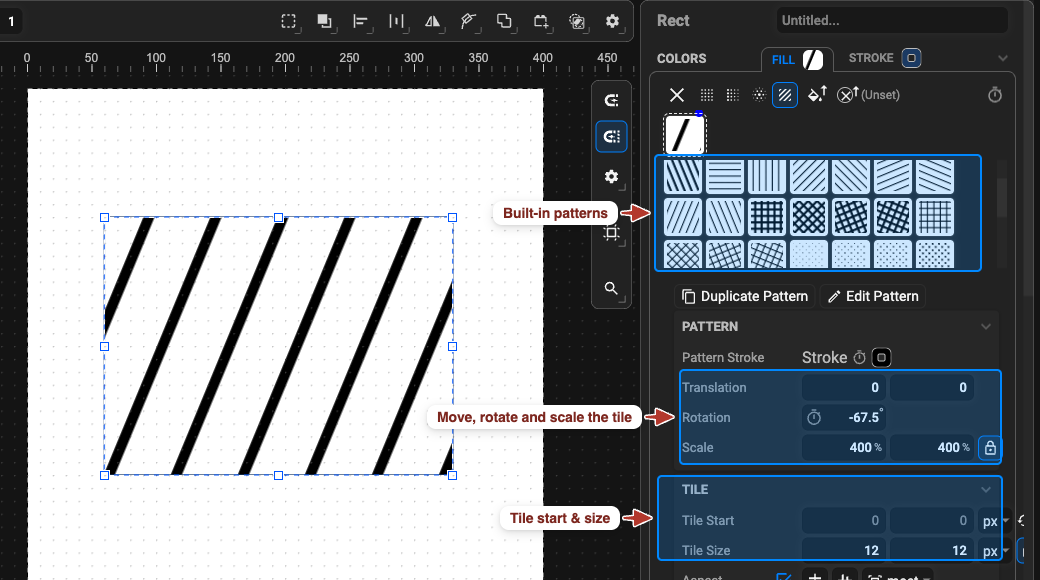
Section titled “Transform the tile”With a pattern applied, the Pattern section controls the tile on this object only:
| Setting | Meaning |
|---|---|
| Translation | shifts the tile grid (X, Y) |
| Rotation | rotates the tiles |
| Scale | resizes the tiles (X, Y, %) |
| Tile Start / Tile Size | the grid itself — origin and size of one tile |
| Pattern Fill / Stroke | the colour of the shapes inside the tile |
Edit a Pattern
Section titled “Edit a Pattern”Double-click the pattern’s thumbnail in the Patterns section — or click Edit Pattern in the
Colors section of an object that uses it — to enter Pattern View. Edit the tile like normal
artwork and click the … row at the top of the Object Tree to return. All objects using the
pattern update.
For a variation, select the pattern in the Patterns section and copy / paste it, or click Duplicate Pattern in the Colors section: a new, unused copy appears.
Delete Unused Patterns
Section titled “Delete Unused Patterns”Click the bin icon next to an Unused pattern in the Patterns section. Patterns still applied to an object cannot be deleted until that object uses another colour type.
Patterns and the Saved File
Section titled “Patterns and the Saved File”Patterns are native SVG (<pattern> referenced from fill / stroke) and survive in SVG and
JSON output. Lottie has no patterns — see SVG ↔ Lottie support.