Effects
An effect is something attached to an object that changes how it is drawn without changing what it is: a rectangle stays a rectangle while a repeater makes twelve of it, a path stays a path while a trim stroke draws it on. Effects live in the Properties panel next to the object’s own properties, most of them animate, and they are what the Pixodesk player and the file format understand as effects. This page is the catalogue; each row links to the full how-to.
| Effect | What it does | Where you set it | Animates | In Lottie |
|---|---|---|---|---|
| Shape preset | keeps a star / polygon / spiral parametric | Shape section | ✓ | ✓ |
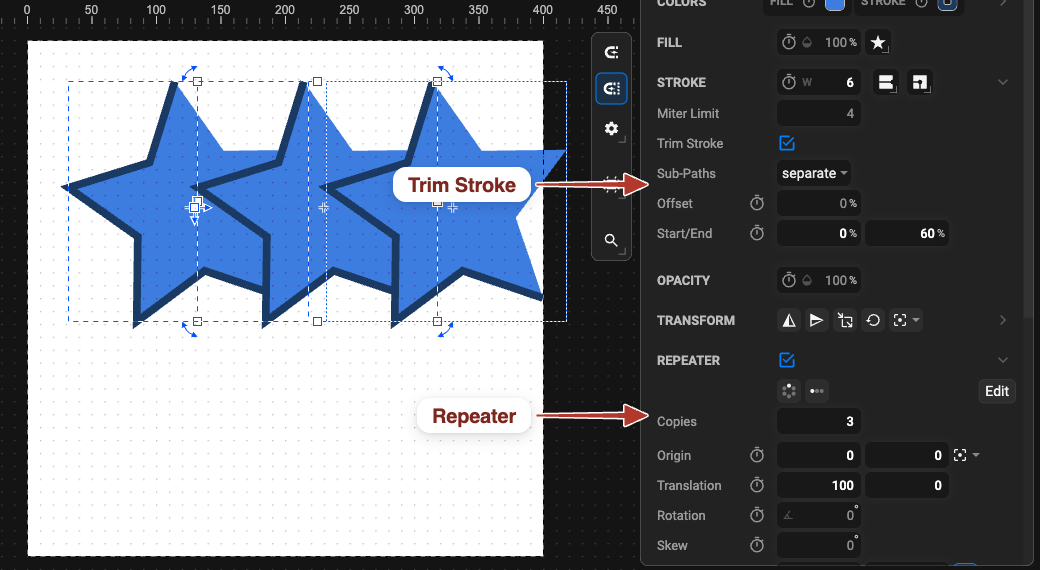
| Repeater | many synchronised copies in a line or circle | Repeater section · Repeater tool | ✓ | ✓ |
| Clone | a linked copy of another object | Edit › Clone | ✓ | ✓ |
| Mask effect | one object controls another’s visibility, both stay editable | Object › Add Mask Effect | ✓ | ✓ |
| Clip path | a hard-edged cut-out by another object’s outline | Object › Make Clip Path | ✓ | ✓ |
| Trim stroke | shows only part of the stroke — draw-on / erase | Stroke section | ✓ | ✓ |
| Motion path | the object travels along a path | Move Element Along Path | ✓ | ✓ |
| Text on path | text follows a curve | Text Path section | ✓ | partly |
| Glyph text | letters embedded as outlines | Font section › Use Glyphs | ✓ | ✓ |
| Gradients | fills and strokes that blend colours | Colors section | ✓ | ✓ |
| Filters | shadows, blur, colour adjustments | Filter section | ✓ | partly |
| Instance timing | a symbol instance or clone plays its source later, faster, cropped | Animation section of the instance | — | ✓ |
In Lottie is the export side; the exact matrix is in SVG ↔ Lottie support. All effects are kept in JSON and SVG + JS output; the CSS-only SVG flavour keeps the static result of every effect and animates a subset — the preview warns you.
Shape Preset
Section titled “Shape Preset”A star, polygon or spiral drawn with the Shape tool keeps its recipe — Points Count and its radii — so you can change the number of points later instead of editing nodes, and keyframe them (a five-point star growing an extra point, a spiral winding up). Converting the shape to a path (Path › Object to Path) bakes the preset. → Shape presets
Repeater
Section titled “Repeater”Turns a group into N copies laid out by Translation, Rotation and Scale steps around an Origin. Edit the group’s content and every copy follows; animate the count or the steps for unfolding fans, ticking clocks, growing grids. → Repeater
A <use> reference to another object — the object drawn again elsewhere, at almost no cost, and
always identical to its source. Clones have their own transform and can lock to or ignore the
source’s position. → Clones
Mask Effect
Section titled “Mask Effect”The lower of two objects defines where the upper one is visible. Unlike a classic mask, the masking object stays a normal, visible, animatable object, and the link is a reference you can remove without changing either. → Mask effect
Clip Path
Section titled “Clip Path”The top object’s outline becomes a hard-edged window for the object below; the clipping shape leaves the canvas. Animated single-path clips keep their animation. → Clip path
Trim Stroke
Section titled “Trim Stroke”Start, End and Offset (in % of the path length) decide which part of a stroke is drawn. Keyframe End 0 → 100 % and the line draws itself; animate Offset for a travelling dash; Trim All as One treats a dashed stroke as one line. → Trim stroke · Draw-on technique
Motion Path
Section titled “Motion Path”Attaches an object to a path so its Position becomes a distance along that path. Keyframe the position and the object travels; the route stays editable. → Move along path · Technique
Text on Path
Section titled “Text on Path”Lays a single line of text along a path, with Offset to slide it, Overflow clip / extend, and the browser’s text-path layout controls. → Text along path
Glyph Text
Section titled “Glyph Text”Embeds the letters actually used as vector outlines, so the file needs no font on the viewer’s machine and text can be converted to shapes. The outlines are listed under Used Glyphs in the Objects panel. → Text › Use Glyphs
Gradients
Section titled “Gradients”Linear and radial gradients for fills and strokes, with animatable stops (colour, position, alpha) and geometry (start / end, centre, radius, focal point). → Linear and radial gradients
Filters
Section titled “Filters”SVG filter chains — drop shadow, blur, glow, colour adjustments, distortions — shared between objects, with animatable numeric settings. → Filters
Instance Timing
Section titled “Instance Timing”A symbol instance or clone can Start its source’s animation later, Stretch its speed, and Crop Time to its own range — one animated source, many differently timed copies. → Symbols › Instance properties · Technique